What is a storyboard? Shot by shot for commercials, with a template
What is a storyboard, what goes in each frame, and how does it differ from a script, shot list and animatic? Shot types, a template and how to make one.
Service AI commercials ·Watch the sample film
What is a storyboard?
A storyboard is a sequence of drawn or generated frames that shows a film shot by shot. A script tells the film in words; a storyboard shows the same film in pictures, in shot order. Under each frame it says what happens in that shot, how long it lasts, what the camera does and what we hear.
The method comes from animation. According to D23, the official Disney fan club, the idea is credited to Disney storyman Webb Smith: in the early 1930s, story sketches began to be pinned up in order on large boards, which made it far easier for the team to see a story than reading a script. Over time the practice spread across film-making, especially to commercials and action sequences.
What is a storyboard for?
A commercial involves dozens of decisions: which shot, which angle, in which second the product appears, where the logo sits. A storyboard makes those decisions visible before production. It does three jobs:
- Everyone sees the same film. The brand, agency and production team talk about the same frames. “That’s not what I imagined” gets said early, while it’s still cheap.
- Changes stay cheap. Changing a frame is a stroke of a pencil; reshooting a shot is a new shoot day.
- Length stays under control. Add up the frame lengths and you can see at a glance whether the film fits into 30 seconds.
What goes in a storyboard frame?
| Field | What to write | Example |
|---|---|---|
| Frame number | Order and scene | 4 / Scene 2 |
| Image | Drawing, photo or generated frame | A car approaching on a wet street |
| Shot size | Wide, medium, close-up, detail | Wide shot |
| Angle and movement | Where the camera is and how it moves | Bird’s-eye, slowly descending |
| Length | Seconds | 3 s |
| Sound | Dialogue, voice-over, music, effects | Rain; music comes in |
| On-screen text | Tagline, logo, legal copy | None |
| Transition | How we get to the next shot | Cut |
The number of frames depends on the rhythm of the film. A fast-cut film needs many more frames than a calm one. What matters is that every shot has a frame.
Shot types: the language of a storyboard
A few terms are enough to read a storyboard:
| Shot | What it shows | When to use it |
|---|---|---|
| Wide shot | The whole location; the person is small | To say where the story takes place |
| Medium shot | A person from the waist up | To show an action or the relationship between two people |
| Close-up | A face or the product | To show emotion or product detail |
| Detail shot | A hand, an eye, a texture | To stress a single detail |
| Bird’s-eye | From directly above | To show a route, an order or a sense of solitude |
| Over-the-shoulder | From behind one person towards another | To set up a look or an encounter |
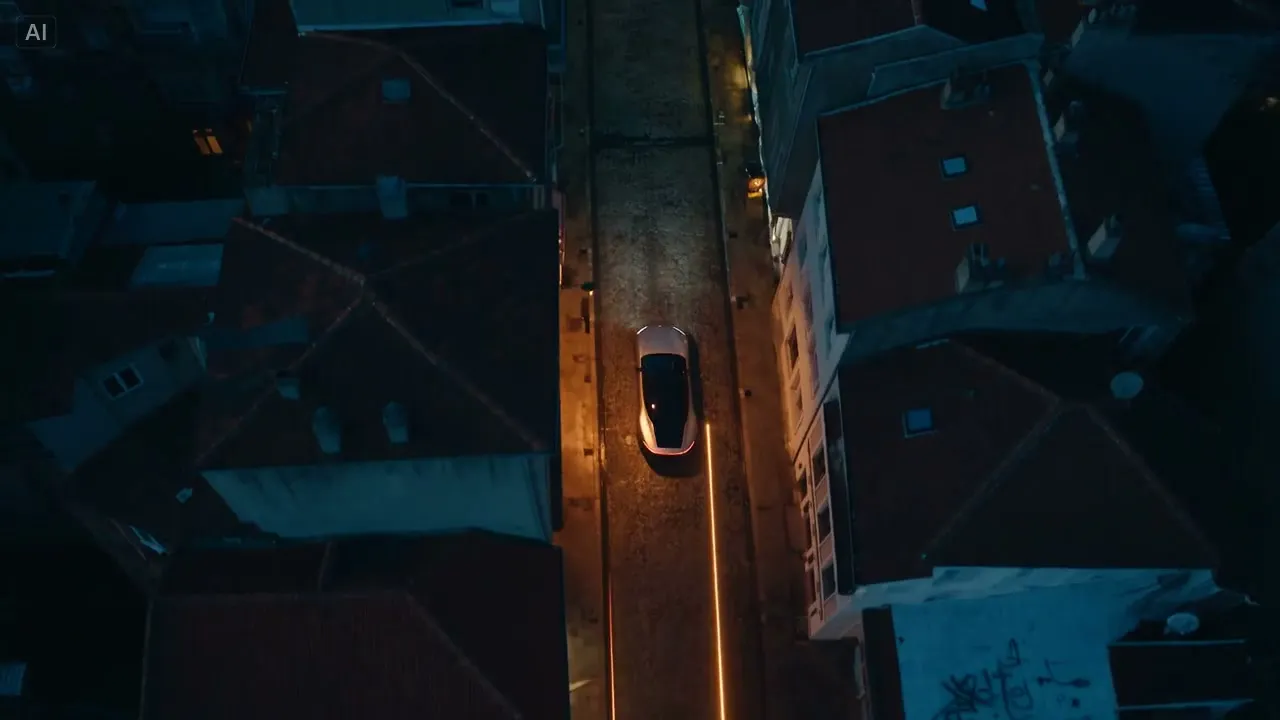
The cover of this article is a bird’s-eye shot from Night, Cinela’s automotive sample film: a car alone in a narrow street tells, in one frame, the story of a solitary night drive through the city. It isn’t client work; it’s a study we made to test the method. To see how its shots are ordered, watch Night.
Storyboard vs script, shot list and animatic
These four documents are often confused because they all describe the same film. The difference is the language they use and what they are for.
| Document | Form | Purpose | When |
|---|---|---|---|
| Script | Text: picture and sound | Fix the story and the words | First |
| Shot list | Table: shot, size, angle, location | Plan the shoot or the generation | After the script |
| Storyboard | Frames and notes | Show how the film will look; get approval | After the script |
| Animatic | The frames cut together with timings and sound | Test rhythm and length | After the storyboard |
The brief comes before all of them: it says what you want to say, to whom and why. We explain how to write one in our creative brief guide.
How to make a storyboard
- Break the script into scenes. Each scene is one place and one time: “night, street”, “morning, kitchen”.
- Break scenes into shots. Each shot is one image; when the camera cuts, a new shot begins.
- Make a frame for each shot. A drawing, a reference photo or a generated image. Clarity matters more than beauty: where is the person, where is the camera, where is the product?
- Write the notes. Length, movement, sound and on-screen text.
- Add up the lengths. If the total runs over the target, cut a shot; don’t squeeze them.
- Mark the product and the logo. In which second does the viewer see the product, and for how long?
- Read it together. Instead of emailing the storyboard, go through it frame by frame with the person who signs off.
Who makes the storyboard?
On a traditional commercial, the storyboard is usually drawn by a storyboard artist working with the director. An agency may make a rougher version to sell the idea; once the director is on board, it gets redrawn with their shots. However detailed the frames are, the aim is the same: everyone reads how the film will look from the same pictures.
The brand’s job isn’t to draw frames but to read them. When a storyboard arrives, ask three questions: Does the story come through from the frames alone? Is the product in the right place? If we removed a frame, would the film lose anything? Frames where the answer to the last question is “no” will most likely be cut in the edit anyway.
A fill-in storyboard template
Copy the table below and fill in one row per shot. The example rows are written for a 15-second vertical ad for a fictional coffee brand’s new iced coffee.
| Frame | Image | Shot and movement | Length | Sound | On-screen text |
|---|---|---|---|---|---|
| 1 | A hot midday; someone stepping out of an office door | Wide shot, static | 2 s | City hum | — |
| 2 | Eyes squinting into the sun | Close-up | 2 s | Cicadas | — |
| 3 | Coffee poured over ice | Detail, slow motion | 4 s | Ice clinking; music comes in | — |
| 4 | The first sip, a face relaxing | Close-up | 4 s | Music | — |
| 5 | Cup and logo | Detail, static | 3 s | Music ends | Logo and tagline |
The five frames add up to 15 seconds. In a vertical film something has to happen in the first frame; here a hot midday and someone stepping outside carry the opening. The product first appears in frame 3, at the turning point, and the logo only in the last frame.
AI storyboards: not a sketch, but the film’s own frames
In traditional production a storyboard is a sketch, and on the day the footage can come out differently. Light, location and the actor’s face are only settled on set. In AI production the storyboard and the film come much closer together: the frame you approve is the image that will be brought to motion.
At Cinela it works like this: on day 1 a brief of about 20 minutes, on day 2 the script and shot list, on days 3–4 a frame for every scene, and on day 5 music, sound, edit and delivery. Any frame you don’t like changes at that step; a change isn’t a reshoot but a regeneration of that frame. No step goes ahead without your approval.
| Traditional shoot | With AI | |
|---|---|---|
| Storyboard | Drawings or a reference collage | The film’s own frames |
| What you approve | An intention | The image itself |
| Changing a frame | Easy, but reinterpreted on set | Frame by frame, same day |
| Changing after the shoot | Reshoot, new budget | Only that scene is regenerated |
We’ve collected six films made this way in our AI commercial examples.
A checklist before you sign off
- Is there a frame for every shot?
- Does every frame have length, movement and sound notes?
- Do the lengths add up to the target?
- Is it clear which frames show the product and the logo?
- Are on-screen text and legal copy marked?
- Have you thought about what gets cropped in the vertical and square cuts?
- Are the shots that need real footage set apart? The product itself, packaging and price, for example.
- Has the person who signs off seen the frames?
The process from storyboard to delivery, what the package includes and the price of a 30-second film, from $1,990 (excl. VAT), are on our AI commercials page.
Sources
The source was checked in November 2026.
- Storyboard
- Commercials
- Pre-production
- Template
More articles
All articles →-
What is a brand film? How it differs from an ad, its structure and cost
What is a brand film, and how does it differ from a commercial, corporate video or branded content? How a good one is built, where it's used, and cost.
Read -
How to write a commercial script: format, structure and an example
How to write a commercial script: the two-column format, a 30-second structure, an original example script, voice-over rules, common mistakes and a checklist.
Read